

Ateminium Multi-Tenant S.M.SAcademic Management Without the Chaos.
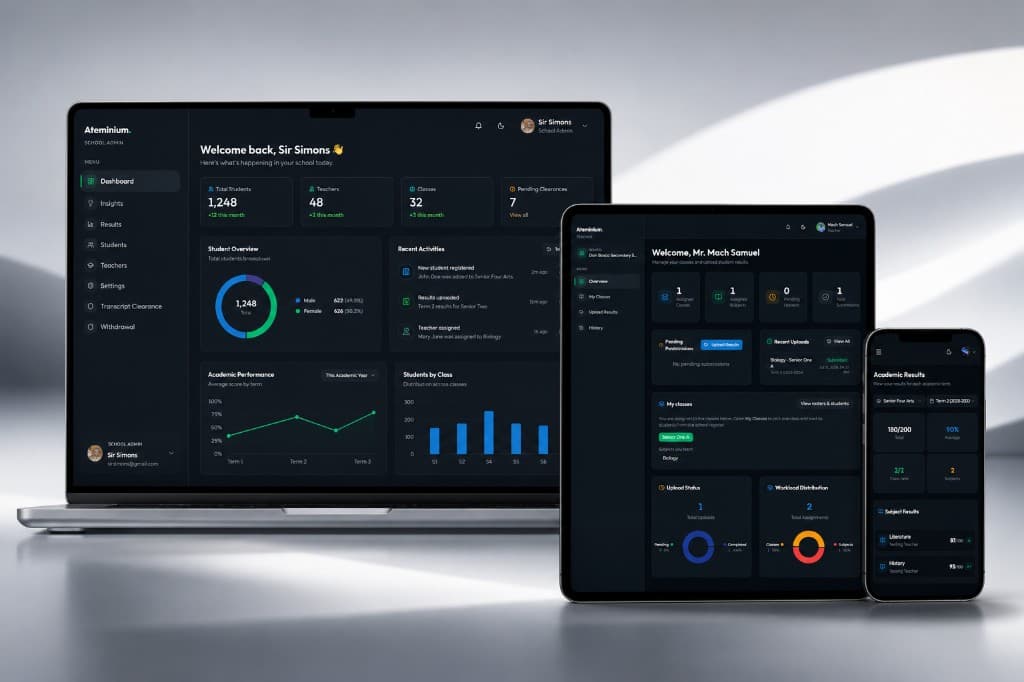
Ateminium is a schools management system for South Sudan, helping schools manage teachers, students, classes, results, and academic records in one secure, centralized platform.
Learn how Ateminium serves schools across SSDLearn how Ateminium serves schools across South Sudan
Academic Work Still Runs on Fragments
Mark sheets in one place, Excel in another, transcripts on paper, and no clear trail of who uploaded what. Sound familiar?
Paper and Manual Grind
Results and records still move by hand. Work gets delayed, duplicated, or lost before it ever becomes a reliable school record.
Spreadsheet Chaos
Excel files live on different devices with no single source of truth, so staff argue over which version is current.
Fragile Academic History
Paper and scattered files are easy to damage, misplace, or distrust when a student needs a complete history.
Blind Upload Status
Admins cannot easily see who submitted results, for which subject, or when the upload happened.
One Platform for the Entire School
Academics, people, and records in one place, without the chaos of fragmented tools and paper workflows.
One School Dashboard
Manage teachers, bursars, students, classes, and subjects in one tenant-scoped place. Your school's single source of truth.
Results Without the Scramble
Teachers upload with a pre-filled Excel template. Students see marks right away. Official transcripts wait for lock and release.
Records That Stay Put
Keep academic history searchable and protected in one secure database, not scattered excel spreadsheets.
Access That Stays in Its Lane
Role-based access for admins, teachers, and students. Each school's data stays isolated and auditable.
Get Started in Five Simple Steps
From school registration to students' results endpoints. How Ateminium gets a school up and running.
- 01
Register Your School
An admin submits your school details and creates the admin account. The school stays pending until review and potential approval.
- 02
Get Approved
Ateminium reviews applications within about 1 working day. After approval, sign in on the Staff tab and receive your School ID (SCH-ID).
- 03
Get the School Ready
Save your class catalog, open an Active term, add teachers with class-subject assignments, then share your School ID.
- 04
Onboard Students
Students self-register by verifying their School ID, pick their class, set a password, and receive a Student ID (STD-ID) for login.
- 05
Run Results
Teachers upload scores with a pre-filled Excel template (0-100). Students see marks right away. Official transcripts wait until the school locks and releases the term.
Everything You Need to Run Your School
A clean, complete suite of tools for school administration, academics, access, and reporting.
School Management
Everything you need to run your institution efficiently

Financial Management
Track school fees, receipts, and unpaid balances with dedicated bursar access.
Teacher Management
Full lifecycle management from onboarding to subject assignments.
Student Portal
Self-service portal for students to view results and records.
Academic Tools
Streamline your academic operations with powerful tools

Subject & Class Management
Seamlessly assign classes to your teachers with the flexible subject and class structures.
Academic Terms
Define and manage academic terms with customizable date ranges.
Excel Integration
Bulk upload results via Excel with template downloads.
Security & Access
Keep your data safe with enterprise-grade security

Term Locking
Lock terms after submission deadline to prevent changes.
Role-Based Access Control
Granular permissions for admin, bursars, teacher, and student.
Analytics Dashboard
Visual insights into school performance and statistics.
Reports & Notifications
Stay informed and generate beautiful reports

Notifications
Real-time alerts for important academic events and updates.
Basic Transcripts
Generate and download simple transcripts showcasing your academic records.
Cloud-Based
Access from anywhere in the world with automatic backups and updates.
Book a Live Demo
Ready to Transform Your School?
Join a community of schools already using Ateminium to streamline their academic management.
- Tailored for Principals
- See Admin + Teacher Flows
- Ask Questions Live
What Ateminium
Actually Delivers
We do not publish made-up school or enrollment counts. Here is what the platform is built to do for South Sudan secondary schools today.
Multi-Tenant By Design
Each school’s data stays isolated. Admins, teachers, and students only see what belongs to their school.
Results After Teacher Upload
Teachers upload marks for the active term. Students can review them on My Results without waiting for term lock.
Official Transcripts When Ready
Transcript PDFs open only after the school locks the term, releases transcripts, and clearance is clear.
Arts & Science Streams
Senior Three and Four support section choice, optional subjects, and section transfers with records kept by class.
Clear Roles
School admins manage staff and settings. Teachers are added by the school. Students sign in with STD-ID.
Secure Access
Encrypted connections, password-gated sensitive actions, and role-scoped dashboards for day-to-day work.
Learn Ateminium Your Way
Written guides and short videos by role. Same topics, pick the format that fits you.
Frequently Asked Questions
Quick answers about Ateminium Multi-Tenant SMS. Setup, trials, security, and day-to-day use.
Tap a question to expand the answer.
How do I register my school?
Click Register Your School and fill out the form with your institution details. Our team will verify and activate your account within 24 hours.
How long does setup take?
It takes about 24 to 48 hours of working days to set up schools' accounts and get them up and running.
Is there a free trial?
Yes, we offer a 30 days free trial on all plans. The trial tier covers about 3–5 teachers and roughly 50–60 students chosen by the school. You can cancel the trial if it doesn't align with your needs.
Is my school's data secure?
We isolate each school's data in the platform, use secure sign-in, and audit sensitive actions. Production deployments use managed database backups and persistent file storage. So, yes, your school's data is secure.
Can a school pay online for subscriptions?
Not exactly. There's NO online payment implemented as of now. Payments are done via banking or handover to an authorised person.
How can a student register?
Students register only with your school's School ID (SCH-ID), which the school admin shares after approval. On Student Signup they verify the School ID, pick their class, and create an account. The system then issues a student ID they use to log in.
Can teachers upload results in bulk?
Yes. Teachers can download our Excel template, fill in student results, and upload them all at once. The system validates data automatically.
Can students download their transcripts?
Yes. After the school admin locks the term and releases transcripts, students can download them from their dashboard anytime (unless clearance is blocked). Viewing marks on the dashboard only needs the teacher upload.
Drop Us a Line
Have a question or need help? We'd love to hear from you. Send us a message and we'll respond as soon as possible.
Contact form
Send Us a Message
Tell us about your school, demo request, or support need. We usually reply within 24 hours.
Need Immediate Help?
Our support team is available Monday through Friday, 9AM to 3:30PM CAT. Send us a WhatsApp message or click the floating icon below.
Dm Us On WhatsAppBring Order to Your School's Academic System
Join a community of schools already using Ateminium to streamline their academic management.
Do NOT miss out for far too long. Order awaits your institution.